
FIU Modalities: Face-to-Face, Hybrid, Fully Online
As FIU continues its repopulation efforts for the upcoming semesters, our university will be offering a robust and safe on-campus experience for our students. As a result, effective Summer 2021, FIU will offer courses in the following modalities:
- Fully In-Person (Mode P)
- Certified Hybrid (Mode H)
- Fully Online (Mode I)
Canvas
Canvas is FIU’s official learning management system (LMS) used for all courses.
- Canvas Support & Resources
Instructors using Canvas have a variety of support options available based on the modality of the course they are teaching.
Additional Resources
- FIU Canvas Help Center: https://fiuhelp.force.com/canvas/s/categories-faculty
- Canvas Resources and Support for Students: https://fiuhelp.force.com/canvas/s/article/Canvas-Resources-and-Support-Information-students
Canvas Instructure:- Announcements in Canvas: https://guides.instructure.com/m/4152/c/23830
- Assignments in Canvas: https://guides.instructure.com/m/4152/c/23831
- Calendar in Canvas: https://guides.instructure.com/m/4152/c/23832
- Chat feature in Canvas: https://guides.instructure.com/m/4152/c/23833
- Collaboration in Canvas: https://guides.instructure.com/m/4152/c/23834
- Course Import Tool in Canvas: https://guides.instructure.com/m/4152/c/23839
- Course Navigation in Canvas: https://guides.instructure.com/m/4152/c/23840
- Discussion Features in Canvas: https://guides.instructure.com/m/4152/c/23845
- Files in Canvas: https://guides.instructure.com/m/4152/c/23847
- Global Navigation in Canvas: https://guides.instructure.com/m/4152/c/23848
- Grades in Canvas: https://guides.instructure.com/m/4152/c/287688
- Groups in Canvas: https://guides.instructure.com/m/4152/c/23850
- Inbox in Canvas: https://guides.instructure.com/m/4152/c/23836
- Modules in Canvas: https://guides.instructure.com/m/4152/c/23855
- Pages in Canvas: https://guides.instructure.com/m/4152/c/23858
- Profile and User Settings in Canvas: https://guides.instructure.com/m/4152/c/23860
- Quizzes in Canvas: https://guides.instructure.com/m/4152/c/23861
- Rubrics in Canvas: https://guides.instructure.com/m/4152/c/23864
- SpeedGrader in Canvas: https://guides.instructure.com/m/4152/c/23867
- Canvas Usage Initiative
The Canvas learning management system (LMS) has become an indispensable part of Florida International University and higher education in general. In Fall 2018, the Provost announced that all instructors will begin utilizing Canvas for all academic courses (whether delivered Face-to-Face, Hybrid, Remote or Fully Online) to include, at minimum:
- Personalize the Canvas front page. This page introduces students to you and your course, including contact information, course description and expectations, office hours, etc.
- Provide the course syllabus in Canvas. Upload your existing syllabus document or develop one in the Syllabus Tool within Canvas.
- Use Canvas communication and collaboration tools. Strongly encouraged but not required. We encourage you to take advantage of the many communication tools available in Canvas that can help organize your messages and announcements. Canvas also simplifies the logistics of student collaboration and group work.
- Course Preparation Request
A Course Preparation Request (formerly known as Course Maintenance) can be submitted within the FIU Canvas Help Center. Instructors can submit a Course Preparation Request to:
- Request a course copy from a past course from Canvas.
- Request multiple courses to be combined or cross-listed into one Canvas shell (prior to the start date of the course).
- Add instructors or teaching assistants to a course.
- Include special instructions related to the course.
*Please note that Course Preparation Requests can take up to two business days to process. - Canvas Training
There are a variety of professional development workshops available for Canvas, Zoom and Honorlock, including general training sessions offered by the university and supplemental weekly trainings offered by the College of Arts, Sciences & Education.
Honorlock
Honorlock is a virtual proctoring solution that uses advanced artificial intelligence (AI) technology to help protect the academic integrity of assessments created within your Canvas course.
- Honorlock Usage - Summer 2021
Beginning Summer A/C 2021, FIU will revert back to the pre COVID-19 proctoring process, where students will again cover the costs associated with any proctored exams. Previously, as a courtesy, the university covered the costs associated with proctored exams for all modalities during Summer 2020, Fall 2020, and Spring 2021.
- Honorlock Features
- Search and Destroy: Secure your test answers. Our technology removes test content from the internet automatically.
- Multi Device Detection: Our award-wining, patented technology prevents mobile devices from searching test answers online.
- Live Pop-In™: The first and only automated system that will prompt a live proctor to "Pop-in" to a student's session.
- Voice Detection: Artificial intelligence listens for keywords to identify possible acts of academic dishonesty and alerts a live proctor to intervene in real-time.
- Step-By-Step Guide
The Honorlock proctoring tool in Canvas is easy and simple to use. Instructors are encouraged to consider the following steps before, during and after an exam that is proctored with Honorlock. Click on each step for more information.
Before Exam
Step 1: Create your exam in Canvas.
Step 2: Select Honorlock LTI tool from the Canvas course menu.
Step 3: Enable Honorlock with exam in Canvas.
Step 4: Create an Honorlock practice quiz to best prepare students.
Step 5: Send exam information and Honorlock resources to students.
During Exam
After Exam
- Honorlock Training
Honorlock Training
This training goes over the basics of setting Honorlock Remote Proctoring Services in your Canvas course. Instructors will learn how to enable an existing Canvas quiz to use Honorlock, the features of the Honorlock Canvas LTI, and the student experience.
- Offered by: ETS
- Training duration: 1 hour
- Frequency: Schedule fluctuates
- Honorlock Support & Resources
Honorlock Support
- Honorlock Phone Support (24/7): 1-844-243-2500
- Honorlock Support Chat: https://honorlock.com/support/
- Honorlock Support Email:support@honorlock.com
Instructor Resources
The resources below provide valuable Honorlock-related information to help instructors become familiar with the Honorlock virtual proctoring service and how it may be used in their exams via Canvas.
- Honorlock (Instructor) Website: https://honorlock.com/faculty/
- Honorlock (Instructor) Resources: https://fiuhelp.force.com/canvas/s/article/Honorlock
Student Resources
Instructors are encouraged to share the links below with their students when using Honorlock to proctor exams through Canvas. The links below may be included in the syllabus, shared via email, or linked within the Canvas course.
- Honorlock (Student) Website: https://honorlock.com/students/
- Honorlock Student Resources: https://fiuhelp.force.com/canvas/s/article/Honorlock-students
- Honorlock Student Checklist: https://case.fiu.edu/about/resources/faculty-staff/coronavirus/_assets/honorlock-student-checklist.pdf
Zoom
Zoom is a web conferencing tool that provides remote conferencing services.
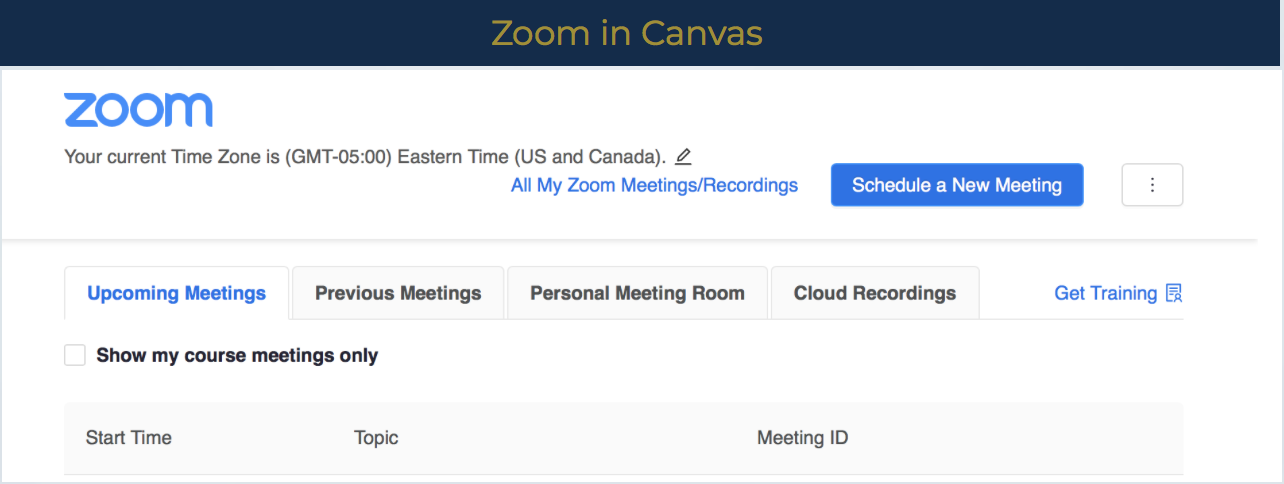
- Zoom in Canvas
Instructors who will be using the Zoom video conferencing tool in their class should create the Zoom Meeting Room in Canvas to ensure students have access to the Zoom meeting information from within their Canvas course shell.
- Zoom Training
- Zoom Support & Resources
Zoom General Questions
Division of IT: 305-348-2814
ASK IT Knowledge BaseZoom in Canvas
305-348-3630
Open a caseZoom in the Classroom
305-348-2815
MMC Hours: Monday-Thursday, 8 a.m.-10 p.m.; Friday, 8 a.m.-6 p.m.
BBC Hours: Monday-Thursday, 8 a.m.-10 p.m.; F riday, 8 a.m.-5 p.m.Resources